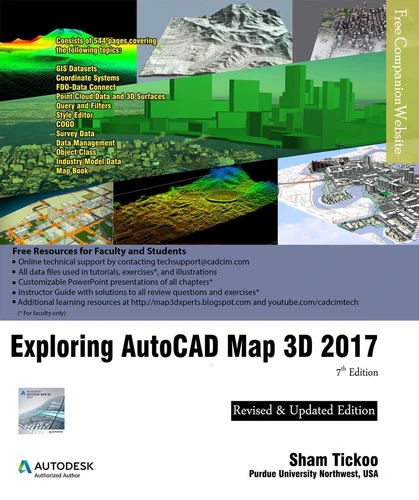
Exploring AutoCAD Map 3D 2017, 7th Edition
Par :Formats :
Disponible dans votre compte client Decitre ou Furet du Nord dès validation de votre commande. Le format ePub protégé est :
- Compatible avec une lecture sur My Vivlio (smartphone, tablette, ordinateur)
- Compatible avec une lecture sur liseuses Vivlio
- Pour les liseuses autres que Vivlio, vous devez utiliser le logiciel Adobe Digital Edition. Non compatible avec la lecture sur les liseuses Kindle, Remarkable et Sony
- Non compatible avec un achat hors France métropolitaine
, qui est-ce ?Notre partenaire de plateforme de lecture numérique où vous retrouverez l'ensemble de vos ebooks gratuitement
Pour en savoir plus sur nos ebooks, consultez notre aide en ligne ici
- FormatePub
- ISBN978-1-942689-45-4
- EAN9781942689454
- Date de parution16/08/2016
- Protection num.Adobe DRM
- Infos supplémentairesepub
- ÉditeurCADCIM Technologies
Résumé
Exploring AutoCAD Map 3D 2017 textbook introduces the users to AutoCAD Map 3D 2017 software. This textbook is a gateway to power, skill, and competence in the field of GIS and spatial analysis. This textbook is specially meant for professionals and students of GIS, Urban Planning, Civil Engineering, Cartography, and CAD professionals who are associated with planning, designing, and data management.
Special emphasis has been laid to explain new concepts, procedures, and methods in GIS by using sufficient text and graphical examples. The accompanying tutorials and exercises, which relate to the real world projects, help you understand the usage and abilities of the tools available in AutoCAD Map 3D. The author has emphasized on the tools, options, functions, and interoperability of AutoCAD Map 3D that allow the users to create, analyze, and save complex geospatial data easily and effectively.
Furthermore, the chapters in this textbook are arranged in pedagogical sequence that makes it very effective in learning the features and capabilities of the software. A real world project is given for the students to reinforce the concepts learned in the chapters. Salient Features of the Textbook: A comprehensive coverage of all concepts and tools of AutoCAD Map 3D 2017 Consists of 11 chapters arranged in pedagogical sequence, and a project Contains 544 pages with hundreds of illustrations Real-world projects and examples focusing on industry experience Step-by-step examples that guide the users through the learning process Includes changes and enhancements specific to AutoCAD Map 3D 2017 Effectively communicates the utility of AutoCAD Map 3D Table of ContentsChapter 1: Introduction to AutoCAD Map 3D 2017Chapter 2: Getting Started with AutoCAD Map 3D 2017Chapter 3: Working with Basic Tools and Coordinate SystemsChapter 4: Working with Feature DataChapter 5: Styling and Querying Feature DataChapter 6: Creating Object Data, and Attaching External Database and QueryChapter 7: Classifying Objects and Working with Classified ObjectsChapter 8: Removing Digitization Errors and Working with TopologiesChapter 9: Data AnalysisChapter 10: Working with Different Types of DataChapter 11: Editing a Map and Creating a Map BookProject: Site Suitability StudyIndex
Special emphasis has been laid to explain new concepts, procedures, and methods in GIS by using sufficient text and graphical examples. The accompanying tutorials and exercises, which relate to the real world projects, help you understand the usage and abilities of the tools available in AutoCAD Map 3D. The author has emphasized on the tools, options, functions, and interoperability of AutoCAD Map 3D that allow the users to create, analyze, and save complex geospatial data easily and effectively.
Furthermore, the chapters in this textbook are arranged in pedagogical sequence that makes it very effective in learning the features and capabilities of the software. A real world project is given for the students to reinforce the concepts learned in the chapters. Salient Features of the Textbook: A comprehensive coverage of all concepts and tools of AutoCAD Map 3D 2017 Consists of 11 chapters arranged in pedagogical sequence, and a project Contains 544 pages with hundreds of illustrations Real-world projects and examples focusing on industry experience Step-by-step examples that guide the users through the learning process Includes changes and enhancements specific to AutoCAD Map 3D 2017 Effectively communicates the utility of AutoCAD Map 3D Table of ContentsChapter 1: Introduction to AutoCAD Map 3D 2017Chapter 2: Getting Started with AutoCAD Map 3D 2017Chapter 3: Working with Basic Tools and Coordinate SystemsChapter 4: Working with Feature DataChapter 5: Styling and Querying Feature DataChapter 6: Creating Object Data, and Attaching External Database and QueryChapter 7: Classifying Objects and Working with Classified ObjectsChapter 8: Removing Digitization Errors and Working with TopologiesChapter 9: Data AnalysisChapter 10: Working with Different Types of DataChapter 11: Editing a Map and Creating a Map BookProject: Site Suitability StudyIndex
Exploring AutoCAD Map 3D 2017 textbook introduces the users to AutoCAD Map 3D 2017 software. This textbook is a gateway to power, skill, and competence in the field of GIS and spatial analysis. This textbook is specially meant for professionals and students of GIS, Urban Planning, Civil Engineering, Cartography, and CAD professionals who are associated with planning, designing, and data management.
Special emphasis has been laid to explain new concepts, procedures, and methods in GIS by using sufficient text and graphical examples. The accompanying tutorials and exercises, which relate to the real world projects, help you understand the usage and abilities of the tools available in AutoCAD Map 3D. The author has emphasized on the tools, options, functions, and interoperability of AutoCAD Map 3D that allow the users to create, analyze, and save complex geospatial data easily and effectively.
Furthermore, the chapters in this textbook are arranged in pedagogical sequence that makes it very effective in learning the features and capabilities of the software. A real world project is given for the students to reinforce the concepts learned in the chapters. Salient Features of the Textbook: A comprehensive coverage of all concepts and tools of AutoCAD Map 3D 2017 Consists of 11 chapters arranged in pedagogical sequence, and a project Contains 544 pages with hundreds of illustrations Real-world projects and examples focusing on industry experience Step-by-step examples that guide the users through the learning process Includes changes and enhancements specific to AutoCAD Map 3D 2017 Effectively communicates the utility of AutoCAD Map 3D Table of ContentsChapter 1: Introduction to AutoCAD Map 3D 2017Chapter 2: Getting Started with AutoCAD Map 3D 2017Chapter 3: Working with Basic Tools and Coordinate SystemsChapter 4: Working with Feature DataChapter 5: Styling and Querying Feature DataChapter 6: Creating Object Data, and Attaching External Database and QueryChapter 7: Classifying Objects and Working with Classified ObjectsChapter 8: Removing Digitization Errors and Working with TopologiesChapter 9: Data AnalysisChapter 10: Working with Different Types of DataChapter 11: Editing a Map and Creating a Map BookProject: Site Suitability StudyIndex
Special emphasis has been laid to explain new concepts, procedures, and methods in GIS by using sufficient text and graphical examples. The accompanying tutorials and exercises, which relate to the real world projects, help you understand the usage and abilities of the tools available in AutoCAD Map 3D. The author has emphasized on the tools, options, functions, and interoperability of AutoCAD Map 3D that allow the users to create, analyze, and save complex geospatial data easily and effectively.
Furthermore, the chapters in this textbook are arranged in pedagogical sequence that makes it very effective in learning the features and capabilities of the software. A real world project is given for the students to reinforce the concepts learned in the chapters. Salient Features of the Textbook: A comprehensive coverage of all concepts and tools of AutoCAD Map 3D 2017 Consists of 11 chapters arranged in pedagogical sequence, and a project Contains 544 pages with hundreds of illustrations Real-world projects and examples focusing on industry experience Step-by-step examples that guide the users through the learning process Includes changes and enhancements specific to AutoCAD Map 3D 2017 Effectively communicates the utility of AutoCAD Map 3D Table of ContentsChapter 1: Introduction to AutoCAD Map 3D 2017Chapter 2: Getting Started with AutoCAD Map 3D 2017Chapter 3: Working with Basic Tools and Coordinate SystemsChapter 4: Working with Feature DataChapter 5: Styling and Querying Feature DataChapter 6: Creating Object Data, and Attaching External Database and QueryChapter 7: Classifying Objects and Working with Classified ObjectsChapter 8: Removing Digitization Errors and Working with TopologiesChapter 9: Data AnalysisChapter 10: Working with Different Types of DataChapter 11: Editing a Map and Creating a Map BookProject: Site Suitability StudyIndex