OFFRE LISEUSES
Une liseuse achetée = une housse offerte* jusqu'au 21 juin

Autodesk Fusion 360: A Tutorial Approach
Par :Formats :
Disponible dans votre compte client Decitre ou Furet du Nord dès validation de votre commande. Le format ePub protégé est :
- Compatible avec une lecture sur My Vivlio (smartphone, tablette, ordinateur)
- Compatible avec une lecture sur liseuses Vivlio
- Pour les liseuses autres que Vivlio, vous devez utiliser le logiciel Adobe Digital Edition. Non compatible avec la lecture sur les liseuses Kindle, Remarkable et Sony
- Non compatible avec un achat hors France métropolitaine
 , qui est-ce ?
Notre partenaire de plateforme de lecture numérique où vous retrouverez l'ensemble de vos ebooks gratuitement
Pour en savoir plus sur nos ebooks, consultez notre aide en ligne ici
C'est si simple ! Lisez votre ebook avec l'app Vivlio sur votre tablette, mobile ou ordinateur :

- FormatePub
- ISBN978-1-936646-66-1
- EAN9781936646661
- Date de parution24/01/2024
- Protection num.Adobe DRM
- Infos supplémentairesepub
- ÉditeurCADCIM Technologies
Résumé
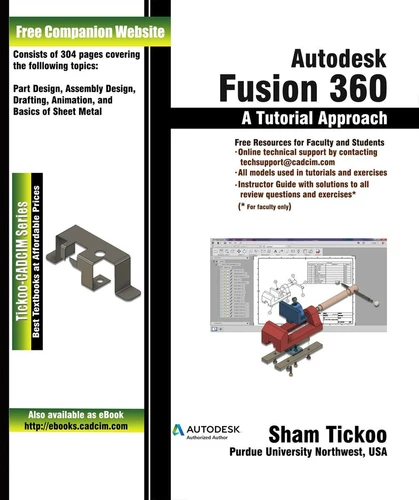
Autodesk Fusion 360: A Tutorial Approach introduces the readers to Autodesk Fusion 360, the first 3D/CAD/CAM/CAE tool that connects the entire product development process in a single cloud-based platform where different design teams work together in hybrid environment and harness the power of the cloud when necessary as well as use local resources. The chapters in this textbook are arranged in pedagogical sequence that makes it very effective in learning the features and capabilities of the software.
This textbook covers all important topics and concepts such as Part Design, Assembly Design, Drafting, Animation, Basics of Sheet Metal. Some of the Salient Features of this textbook are as follows:Textbook consisting of 10 chapters that are organized in a pedagogical sequence. Summarized content on the first page of the topics that are covered in the chapter. More than 40 real-world mechanical engineering problems used as tutorials and projects with step-by-step explanation.
Additional information throughout the book in the form of notes and tips. Self-Evaluation Tests and Review Questions at the end of each chapter to help the users assess their knowledge. Technical support by contacting [email protected]. Additional learning resources at http://allaboutcadcam.blogspot.com. Table of ContentsChapter 1: IntroductionChapter 2: Drawing Sketches for Solid ModelsChapter 3: Adding Constraints and Dimensions to SketchesChapter 4: Advance Modeling-IChapter 5: Creating Reference GeometriesChapter 6: Advance Modeling-IIChapter 7: Assembling ComponentsChapter 8: Working with Drawing and Animation WorkspaceChapter 9: Working with Sheet Metal ComponentsChapter 10: Managing and Collaborating on the CloudStudent ProjectIndex
This textbook covers all important topics and concepts such as Part Design, Assembly Design, Drafting, Animation, Basics of Sheet Metal. Some of the Salient Features of this textbook are as follows:Textbook consisting of 10 chapters that are organized in a pedagogical sequence. Summarized content on the first page of the topics that are covered in the chapter. More than 40 real-world mechanical engineering problems used as tutorials and projects with step-by-step explanation.
Additional information throughout the book in the form of notes and tips. Self-Evaluation Tests and Review Questions at the end of each chapter to help the users assess their knowledge. Technical support by contacting [email protected]. Additional learning resources at http://allaboutcadcam.blogspot.com. Table of ContentsChapter 1: IntroductionChapter 2: Drawing Sketches for Solid ModelsChapter 3: Adding Constraints and Dimensions to SketchesChapter 4: Advance Modeling-IChapter 5: Creating Reference GeometriesChapter 6: Advance Modeling-IIChapter 7: Assembling ComponentsChapter 8: Working with Drawing and Animation WorkspaceChapter 9: Working with Sheet Metal ComponentsChapter 10: Managing and Collaborating on the CloudStudent ProjectIndex
A propos de Sham Tickoo

33,49 €
33,49 €

33,49 €

33,49 €

33,49 €

35,49 €


36,99 €


36,99 €


37,49 €