SOLDES
Jusqu'à -70% sur une sélection d'articles*

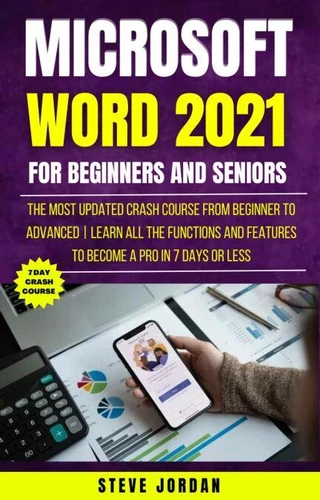
Microsoft Word 2021 For Beginners And Seniors: The Most Updated Crash Course from Beginner to Advanced | Learn All the Functions and Features to Become a Pro in 7 Days or Less
Par :Formats :
Disponible dans votre compte client Decitre ou Furet du Nord dès validation de votre commande. Le format ePub est :
- Compatible avec une lecture sur My Vivlio (smartphone, tablette, ordinateur)
- Compatible avec une lecture sur liseuses Vivlio
- Pour les liseuses autres que Vivlio, vous devez utiliser le logiciel Adobe Digital Edition. Non compatible avec la lecture sur les liseuses Kindle, Remarkable et Sony
 , qui est-ce ?
Notre partenaire de plateforme de lecture numérique où vous retrouverez l'ensemble de vos ebooks gratuitement
Pour en savoir plus sur nos ebooks, consultez notre aide en ligne ici
C'est si simple ! Lisez votre ebook avec l'app Vivlio sur votre tablette, mobile ou ordinateur :

- FormatePub
- ISBN8223145837
- EAN9798223145837
- Date de parution26/04/2023
- Protection num.pas de protection
- Infos supplémentairesepub
- ÉditeurDraft2Digital
Résumé
Word 2021 provides essential in-depth coverage of the concepts required to use Microsoft Word effectively. This comprehensive overview of Microsoft Word provides learners with the skills needed to acquire a greater understanding of this versatile application. Fully illustrated with detailed instructions and step-by-step guidance, readers will gain a greater insight into the functionality and diverse range of features available within Microsoft Word.
Use the basic functions of Microsoft Word Create documents Format documents Create and format objects Carry out a mail merge Prepare outputs with page setup and printing Apply advanced text, column, paragraph and table formatting Use templates, fields and forms Use referencing features including footnotes, endnotes and captions. Insert cross references, indexes and create a table of contents Use linking and embedding features Use advanced mail merge features Use automation features including macros Collaborate and review documents Insert headers and footers, as well as watermarks Apply document security features Work with master documents and subdocuments and many more.......
What else will you like to learn about word 2021, click the buy now button to get yourself a copy of this book.
Use the basic functions of Microsoft Word Create documents Format documents Create and format objects Carry out a mail merge Prepare outputs with page setup and printing Apply advanced text, column, paragraph and table formatting Use templates, fields and forms Use referencing features including footnotes, endnotes and captions. Insert cross references, indexes and create a table of contents Use linking and embedding features Use advanced mail merge features Use automation features including macros Collaborate and review documents Insert headers and footers, as well as watermarks Apply document security features Work with master documents and subdocuments and many more.......
What else will you like to learn about word 2021, click the buy now button to get yourself a copy of this book.