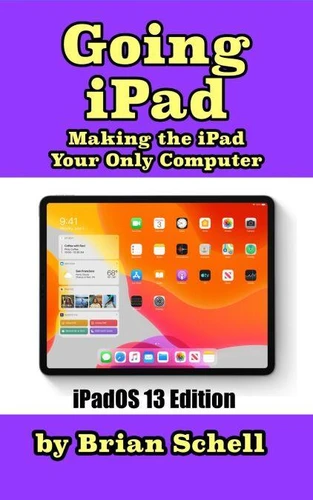
Going iPad (Third Edition)* Note: This THIRD edition was updated September 2019 and covers iPadOS 13!Thinking about buying an iPad but not sure if the iPad's operating system will suit your needs? Just bought one and want to learn the ins and outs of how to use it? Have you been using the iPad, and want to take your usage to the next level and go iPad-only? With the iPad and iPad Pro, plus the new addition of iPadOS 13, it's more possible to ditch the desktop than ever before. This book begins by introducing you to the benefits involved with switching to the iPad, explaining the different options and benefits involved with purchasing them, and then walks you through preparing and putting your data "in the cloud." Great hardware is only as good as the software it runs, so we fully discuss the best apps from most categories, usually with several options to choose from. The third section covers tips and tricks that are unique to the latest version of iPadOS, released in the autumn of 2019.
We assume you know the basics of how to use the iPad already, so we focus on multitasking, gestures, drag-and-drop, voice input, fonts, working remotely, and more. Can YOU "Go iPad" and live a mobile lifestyle? Chances are excellent that you can!
Going iPad (Third Edition)* Note: This THIRD edition was updated September 2019 and covers iPadOS 13!Thinking about buying an iPad but not sure if the iPad's operating system will suit your needs? Just bought one and want to learn the ins and outs of how to use it? Have you been using the iPad, and want to take your usage to the next level and go iPad-only? With the iPad and iPad Pro, plus the new addition of iPadOS 13, it's more possible to ditch the desktop than ever before. This book begins by introducing you to the benefits involved with switching to the iPad, explaining the different options and benefits involved with purchasing them, and then walks you through preparing and putting your data "in the cloud." Great hardware is only as good as the software it runs, so we fully discuss the best apps from most categories, usually with several options to choose from. The third section covers tips and tricks that are unique to the latest version of iPadOS, released in the autumn of 2019.
We assume you know the basics of how to use the iPad already, so we focus on multitasking, gestures, drag-and-drop, voice input, fonts, working remotely, and more. Can YOU "Go iPad" and live a mobile lifestyle? Chances are excellent that you can!