
Anurag S Pandey is a writer, poet and computer programmer. His poems have been published in national newspapers and magazines of India like Navbharat Times, Kadambini etc. He has written Story/ Screenplay/ Dialogues for various TV Shows like Lady Inspector, Shaka Laka Boom Boom, Indonesian TV shows etc. At present he lives in Bhubaneswar, India. Meditation, yoga, mystery, paranormal & supernatural activities are some of his favorite topics to read and write.
Advanced Ludo Using Excel VBA: Zero-Object Interface: Just Cells and VBA — Learn Game Logic by Building Ludo — Complete Code Included
Par :Formats :
Disponible dans votre compte client Decitre ou Furet du Nord dès validation de votre commande. Le format ePub est :
- Compatible avec une lecture sur My Vivlio (smartphone, tablette, ordinateur)
- Compatible avec une lecture sur liseuses Vivlio
- Pour les liseuses autres que Vivlio, vous devez utiliser le logiciel Adobe Digital Edition. Non compatible avec la lecture sur les liseuses Kindle, Remarkable et Sony
 , qui est-ce ?
Notre partenaire de plateforme de lecture numérique où vous retrouverez l'ensemble de vos ebooks gratuitement
Pour en savoir plus sur nos ebooks, consultez notre aide en ligne ici
C'est si simple ! Lisez votre ebook avec l'app Vivlio sur votre tablette, mobile ou ordinateur :

- FormatePub
- ISBN8230270744
- EAN9798230270744
- Date de parution29/01/2025
- Protection num.pas de protection
- Infos supplémentairesepub
- ÉditeurIndependently Published
Résumé
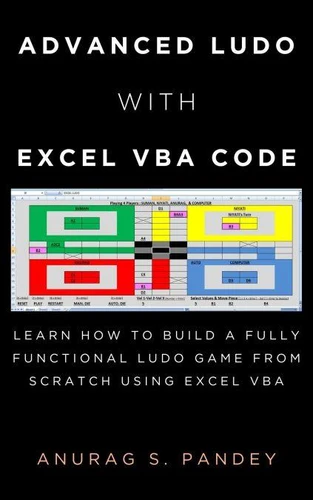
Build a Fully Functional Ludo Game in Microsoft Excel Using VBAHave you ever wondered whether you can create a complete, playable Ludo game directly inside Microsoft Excel?This book provides 1, 800+ lines of VBA code and straightforward instructions for creating a fully functional Ludo game in an Excel worksheet. There is no need to manually draw the board or create the game interface. Copy the provided VBA code into the Excel VBA Code Editor, run the macro, and the Ludo board, layout, and game controls are automatically generated in the worksheet.
What You Can CreateThe completed game includes: Human vs. Human gameplay Human vs. Computer gameplay Computer vs. Computer gameplay Rule-based computer-player logic Manual and automatic dice controls Multiple players and Ludo pieces Piece selection and movement Reset and restart controls Complete game and turn logic An interactive Ludo board generated directly by VBA A Zero-Object InterfaceOne of the distinctive features of this Ludo project is its zero-object interface.
The game does not require you to manually create Excel shapes, form controls, buttons, or other graphical objects to build the board and interface. Instead, VBA generates the game directly in the Excel worksheet, including the board layout and controls. This makes the project an interesting example of how VBA can transform a standard worksheet into an interactive game. Learn From a Complete VBA ProjectThe book isn't just a collection of code.
The complete project gives you an opportunity to explore how VBA can be used to implement game mechanics and programming logic. You can examine and experiment with: VBA programming Game and turn logic Dice and movement rules Player and piece management Computer-player decision logic Worksheet formatting through VBA Interactive controls Programming logic used to manage a playable board game Complete Code IncludedThe book includes 1, 800+ lines of VBA code used to create the Ludo game.
The basic process is simple:Copy the code ? Paste it into the VBA Code Editor ? Run the macro ? Play the generated Ludo game. After creating the game, you can explore the code, experiment with its logic, and make your own modifications. Who Is This Book For?This practical VBA project can be useful for: Excel VBA learners Excel users interested in programming Beginners looking for a hands-on VBA project Programmers interested in game development Students exploring programming logic Anyone interested in creating a Ludo game in Excel If you want to explore what is possible with Excel VBA beyond traditional spreadsheets, this project gives you a practical way to build, examine, and play a complete Ludo game inside Excel.
Build the game. Explore the code. Understand the logic. Play Ludo-all inside Microsoft Excel.
What You Can CreateThe completed game includes: Human vs. Human gameplay Human vs. Computer gameplay Computer vs. Computer gameplay Rule-based computer-player logic Manual and automatic dice controls Multiple players and Ludo pieces Piece selection and movement Reset and restart controls Complete game and turn logic An interactive Ludo board generated directly by VBA A Zero-Object InterfaceOne of the distinctive features of this Ludo project is its zero-object interface.
The game does not require you to manually create Excel shapes, form controls, buttons, or other graphical objects to build the board and interface. Instead, VBA generates the game directly in the Excel worksheet, including the board layout and controls. This makes the project an interesting example of how VBA can transform a standard worksheet into an interactive game. Learn From a Complete VBA ProjectThe book isn't just a collection of code.
The complete project gives you an opportunity to explore how VBA can be used to implement game mechanics and programming logic. You can examine and experiment with: VBA programming Game and turn logic Dice and movement rules Player and piece management Computer-player decision logic Worksheet formatting through VBA Interactive controls Programming logic used to manage a playable board game Complete Code IncludedThe book includes 1, 800+ lines of VBA code used to create the Ludo game.
The basic process is simple:Copy the code ? Paste it into the VBA Code Editor ? Run the macro ? Play the generated Ludo game. After creating the game, you can explore the code, experiment with its logic, and make your own modifications. Who Is This Book For?This practical VBA project can be useful for: Excel VBA learners Excel users interested in programming Beginners looking for a hands-on VBA project Programmers interested in game development Students exploring programming logic Anyone interested in creating a Ludo game in Excel If you want to explore what is possible with Excel VBA beyond traditional spreadsheets, this project gives you a practical way to build, examine, and play a complete Ludo game inside Excel.
Build the game. Explore the code. Understand the logic. Play Ludo-all inside Microsoft Excel.
A propos de Anurag Pandey


2,99 €

पागल कथाकार
E-book
0,99 €

The Mad Storyteller
E-book
0,99 €

2,99 €


Let's Play with Excel
E-book
3,49 €


0,99 €

Truth Always Wins
E-book
0,99 €

Just for Fun
E-book
0,99 €

Fitoor
E-book
0,99 €

0,99 €